
leaving Flickr and hosting my own photos
After years of feeling disappointed in Flickr, I’ve finally done something about it, throwing together my own photo hosting, and I feel pretty good about it.
Let me start with… I’m not exactly sure why I’ve so long felt disappointed in Flickr. It’s funny, I can’t quite name much that I want to be substantially better. (Well, a better API would go a long way with me, actually.) Mostly, it just feels so stagnant. How do I want it to change? I’m not sure. I’d like it to feel “less clunky”. What does that mean? Look, I just don’t know. I don’t mean to say there’s anything wrong with Flickr, but also, why should I keep paying them if I feel unsatisfied?
And as for paying: Flickr Pro is about $85 per year. Five years ago, it was $50 per year. I often compare online service fees to Fastmail: am I getting more out of this service than I get for my notional $60 from Fastmail? Comparisons are odorous, but I keep sniffing at’m.
Anyway, I’d think about how I’d replace Flickr pretty often, but only distractedly, or the day after my subscription renewed, when the win seemed smallest. Finally, though, I had a few hundred photos from traveling that needed uploading, and my question was, “Do I want to upload these to Flickr, or do I want to upload them to something new?” Also, I think I just felt bored and wanted to do something that would have a start and a finish.
There were two things that made this all work: the first was finally sitting down and thinking about how to make it work. The second was offloading the programming to Claude.
the initial design
There’s so very, very little design here. The biggest question I had was, am I building a web app or a static site generator? A web app had lots of reasons to not like it, especially “hosting all the originals is a lot of space” and “image handling code is a source of bugs forever” and “security, security, security”. A static site is easy as heck, but felt even more tedious to code. Good news: I didn’t need to code it.
Here’s the design I decided on:
- There’s a directory of originals. All my photos and videos stored by content hash. Meaningless filenames thrown in a pile that I back up very carefully.
- There’s a directory of metadata. These are TOML files, one per original, with exactly the same path structure and filenames, in a parallel directory. It’s a git repo. I back that up, too. I considered using an SQLite database, and may move to that later, but the efficiency gains don’t seem likely to be a big deal, and history and grep are nice.
- There’s a directory of derived data. These are rendered images and videos, scaled to well-known aspect ratios, mostly in webp, with EXIF data stripped. Also, JSON metadata about the images. This is cache. If I lose this, I can regenerate it all. I forget how long it took to generate the first time on my laptop. A few hours, maybe, but it was on external storage and I spent zero time on making it efficient.
- There’s a directory of the site. That’s the HTML and CSS and JavaScript for all the pages, rendered into flat files that can be dumped into hosting.
phase one: getting started and getting my data
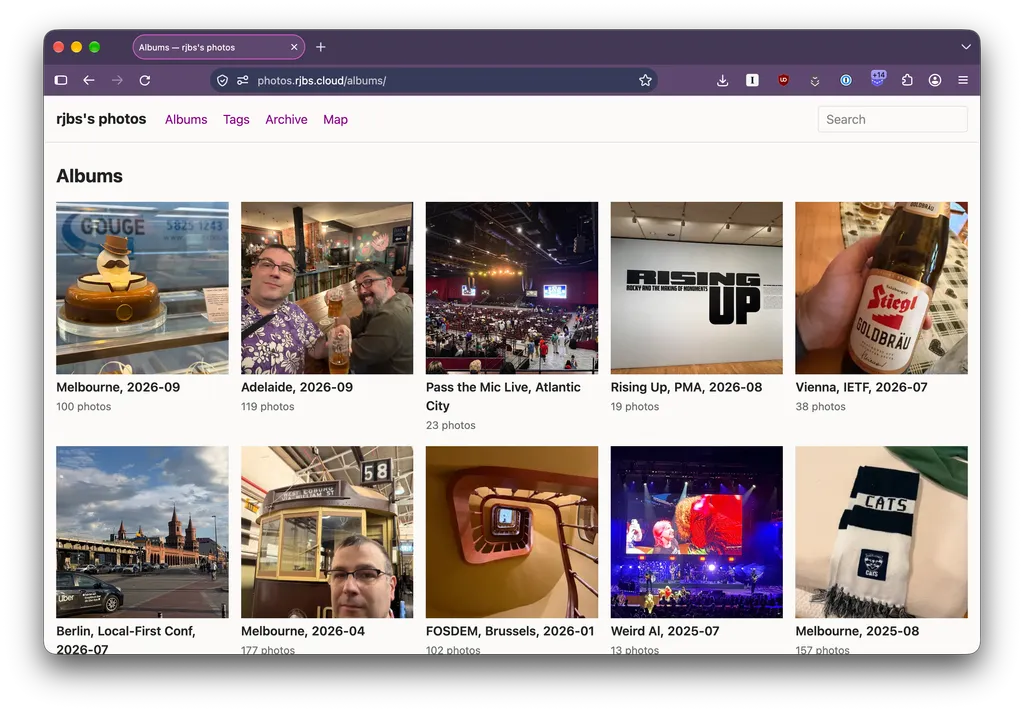
So, I took this design to Claude and I said, “I want a static site generator to replace my use of Flickr. Here’s my design. Here are the features that I use in Flickr.”
Claude said, “Your plan sounds great, and you’re very handsome. You should start by requesting a data export from Flickr, that’ll be the most time-consuming part!”
At this, I felt pretty clever. I said, “Actually, I have been updating an incremental backup of my Flickr account for maybe fifteen years. We already have all the data we need!”
Claude said, “Wow, great news! Can I see your backups?” I attached the volume and Claude did a bunch of poking around before saying, “Your backups are hosed in these eleven ways. You’ll want to talk to the maintainer of the backup software.”
Good news: the maintainer of the backup software is me. I fired up some more Claude sessions and got to work organizing a run through all sorts of bugs. Some in one layer, some in another, some of unknown origin but resulting in bogus data. I fixed a lot – more than I’ve released, so far, actually. This was a little fun. I got to use the new-ish session-to-session messaging features. “Tell the agent working on the API layer to read your latest bug reports and see if they’re our bugs or Flickr’s.” In the end, though, I was going to have to do a full “retry every file” backup of my 12,000 photos. Fine! Part of the bugfixing was replacing the “just sleep 2 seconds every time” approach to rate limit management with something that looked at the wallclock and could microsleep.
The remaining problem was that Flickr’s API rate limits only apply to API calls for metadata. Downloading originals hits a distinct, undocumented, no-explanation-given rate limit in CloudFront or something. Also, it wasn’t clear that I was getting out my video originals. I kept getting MP4s, even though I’d uploaded MOVs.
Somewhere in all this, I finally did click “begin data export”. A day later, Flickr emailed me that it was ready. I downloaded 26 zip files, each between one and two gigs. I extracted them, pointed Claude at them, and it said, “Finally, a good backup!”
phase two: summoning it up
The parallel line of work here was building a proof of concept using a hundred recent photos.
The first thing created was the ingest command. You run it on a directory of files and it hardlinks them into the originals tree, writes out stub metadata files, and produces all the derived data.
From there, you can edit the metadata files (or not) and run build, which builds the static site. It’s almost silly how much of the work that covers, and which I didn’t have to do. I gave some feedback on layout, but mostly I said, “here’s my super-boring website, match that”, and then later, “lay bricks, don’t build a grid”.
Claude built the pages, the album pages, tags, and an interactive map. (“Copy the map design from my site.”) It pointed out features from Flickr that I didn’t know about but that it brought in. “You can name places where you want extra fuzziness of map data.”
phase three: hosting and embedding
Now that I had a all this HTML – around ten gigs of images and HTML – I needed somewhere to put it. My plan had been to use Cloudflare R2, but I quickly found a problem: I wanted to use a hostname in one of my domains, but Cloudflare will only point a domain at R2 buckets if they control the whole domain. This was a non-starter for me.
I went and found some other options: Backblaze B2, DigitalOcean Spaces, and others. They all had problems, usually either that domain problem or they wouldn’t serve an index.html on a bare “directory”, to mangle S3 semantics. Just to get things going, I decided to use nginx on a DigitalOcean Droplet. It went how you’d expect: I set up the domain, ran certbot, rsynced a lot of bytes, and then it all just worked. It was plenty fast, too! Maybe this would be all I needed. On one hand, at around $7 per month, I was looking at nearly exactly the same that I paid for Flickr! On the other hand, I already had this Droplet around, so this was $0 extra dollars per month.
Now, the other thing I wanted was to be able to easily embed photos in my blog. Until now, it was a pain. I’d go to Flickr and get their embedding code and edit it down from its obnoxious bigness. Then I’d stick this in a post in my (Jekyll-based) blog:
<a href="https://www.flickr.com/photos/rjbs/5493850823/" title="Alar Map">
    <img src="https://live.staticflickr.com/5013/5493850823_6b100a8c78_c.jpg" width="800" height="742" alt="Alar Map" />
</a>
I wanted to replace this with something like…
{% photo 5493850823 %}
This was easy! I was already building metadata about every image, which could be available to my site builder for the blog. (Will the blog and photo site ever be merged into one thing? Maybe, but I doubt it.) Better yet, all of my new photo metadata included the original Flickr ids, so I could mechanically replace all of the links.
Still better yet, I could use that data to provide a nice, pretty embedded image with caption-on-hover. Flickr had code for doing this, but it meant running Flickr’s JavaScript on my site. Yuck on both “Flickr’s” and “JavaScript”. This should all work with CSS!
Another round of “here’s just what I want described got me just what I wanted:
phase four: the editor
Now I could host all my photos online, and I had a pile to import. The question was, did I want to ingest them all and edit hundreds of TOML files by hand? Get real.
The next phase was roughly, “I want to run edit and bring up a batch of photos to edit. On the right, a contact sheet that I can multi-select on. On the left, metadata. Show what’s dirty. Let me revert it. Give me a save button that locks the UI, commits the changes to git, and lets me go back to editing. It just runs a web server long enough for me to use it to do this work, then I kill it.”
This got me what I wanted, and I used it to caption and tag hundreds of photos in a few albums. Then I ran build and the new sync command, which just wrapped rsync to my Droplet.
I’ll throw in a later phase here: eventually I came back to the editor and said, “You know, rather than me specifying a search on the command line, let’s give the server a basic browser so I can search, bring up batches to edit, create albums, and see my private photos.” This worked well. I expect to use it once every other month or so, but it’s going to work better for me than the Flickr Uploadr and Organizr do.
On the other hand, there’s no actual uploader. I get photos onto my site, from my phone, by plugging my phone into my computer, running Image Capture, and running ingest on those files. This is what I did before, so who cares? It has never been a problem for me. It’s not a very 2026 way of working, though.
phase five: hosting
Using a Droplet for all this wasn’t sitting well with me, after a while. It was using nearly all my storage, and felt like at some point I was going to fill my volume and be miserable. Also, was my crummy little VPS going to get me the kind of performance I wanted. (Yes, it was, but I was dreaming.)
I got back to looking at other hosting services, and eventually found Bunny. It has an S3 interface, but it’s new and experimental. Instead, I used its proprietary storage interface. It’s whatever, not a problem.
Bunny is in this not-that-new-anymore category of services that’s a CDN and an edge compute layer. Probably very cool for doing all kinds of things, but I wanted something very simple and boring: static site hosting.
“Claude,” I said, “write a new sync backend, for Bunny.”
Claude got to work, and eventually said, “This is going to be really expensive to sync because of how you invalidate your cache in Bunny.”
“Well,” I said, “what if we move all the images into a different path than the HTML, so they’re cached forever, and we can prefix-flush the HTML cache?”
Claude wasn’t sure, “The problem with that is that it will break all the links you’ve already published to all your photos!”
“Claude,” I said, “my site has been published for about four days and nobody links to it. I think we’re good.”
A few hours later, the site was fully synced into Bunny, and I pointed a “pull zone” at it. This is CDN speak for “I told the edge servers to fetch from my storage for URLs with a simple mapping to the storage content.” I am very up on modern hosting.
Now, how much faster is Bunny? Possibly not faster at all. On a cold cache, slower, anyway. Once the edge has the content cached, I can’t see a difference, although I bet Bunny is faster. The biggest question is, how much cheaper is Bunny? I’ll have to wait and see, but my estimate is that it’s going to cost me about $1.50 a month.
and that’s it
From start to finish was about a calendar week. I did most of the work the first two days, and then an hour or two a day for the rest of the week. The kind of satisfaction gained from summoning up code from an agent is different than from coding it by hand, but it’s still satisfying. I spend more time thinking about the design and structure, and less on the specific subroutines. In some projects, I delve into subroutines. This is important for load-bearing money-charging code. For the stuff that throws together a bunch of static HTML that I host in a bucket? Eh. The real satisfaction here is more about having a place to put the photos I take while doing stuff.
The whole thing is on GitHub, less because I’m sharing it and more because I needed to host the code somewhere.
I named it “Jiggle”, in reference to jGal, my original static image gallery generator. I named that after iGal, by Eric Pop, which I forked from. That was in 2003, and I switched to Flickr a few years later. jGal was 1,100 lines of Perl. Jiggle is only around 7,000 – impressive, all told.
I told Claude about the origin of the name before ending our session, and it said:
Sleep well. You have a photo site of your own again, 23 years after jGal.
Laying it on kind of thick, but it was nice to come full circle.