
building my todo list app
For years, I’ve wanted a better daily to-do checklist. I had a good idea what I wanted from it, but I knew it was going to be a pain to produce. It didn’t have any complicated ideas, just a bunch of UI considerations, and that’s not my area of expertise, so I’ve made do with a bunch of worse (for me) options, which has, for me, led to worse outcomes. I accepted the tradeoffs, but I wasn’t thrilled. Now I’ve finally built exactly the app I wanted, and it went great. I call it, for now, NerfJournal.
Project Seven: NerfJournal
That’s right, this is another “stuff Rik did with Claude” post. This one feels like maybe the project that had the greatest impact on me so far, and that’s in three ways: First, the tool I’ve produced is genuinely useful and I use it daily. Secondly, it made clear the ways in which the realm of coding easily available to me was expanded by agents. Finally, it’s been a great way to not just access but also learn those things, which I’ll write about in a follow-up post.
Anyway, the project is called NerfJournal, because it’s like a bullet journal, but wouldn’t really hurt anybody. Except me, if Hasbro decides to complain about the name.
I try to stick to a routine in setting up my work today. I have “work diary”, a bit like Mark Dominus once wrote about, and which I got to see in practice when we last worked together. This journal is very simple. There’s a bunch of checkboxes of things I mean to do every day, and then there’s space for notes on what else I actually did. I try to add a new page to this every day, and I’ve got a Monday template and a “rest of the week” template. The Monday template includes stuff I only need to do once a week. Here’s a sample page, not filled in:
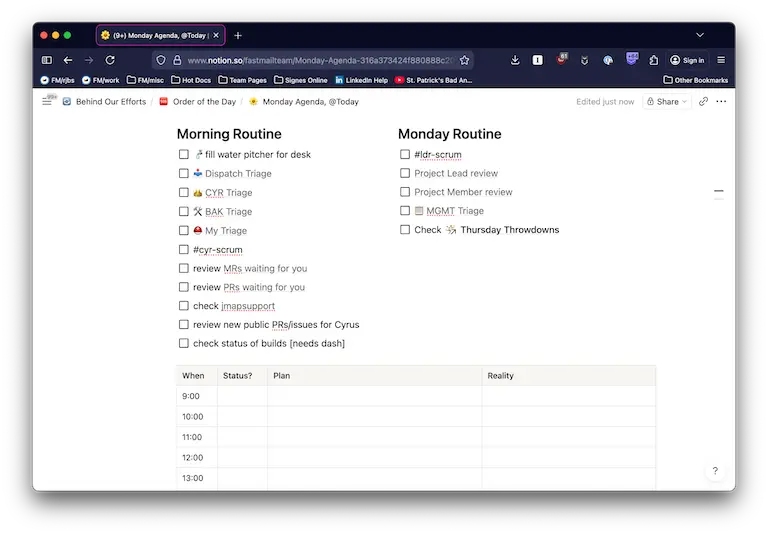
You’ll see that the 6th item on the morning routine is to post to #cyr-scrum.
This is the Slack channel where, every day, the Cyrus team members are each
meant to post what we did the previous day and what we’re going to do today.
While the Notion page includes “stuff I do every day, but might forget”, the
#cyr-scrum post is generally “stuff I won’t do again once it’s done, and
might need to carry over until tomorrow”.
That is: if I didn’t fill my water pitcher today, I failed, and tomorrow I’ll
get a new instance of that to do. It’s not “still open”, it’s a new one, and
it’s interesting (well, to me) whether I kept up a streak. On the other hand,
if I post in #cyr-scrum that I’m going to complete ticket CYR-1234, but I
don’t do it, I better do it tomorrow. And if I do, there’s no reason to see it
again on the next day.
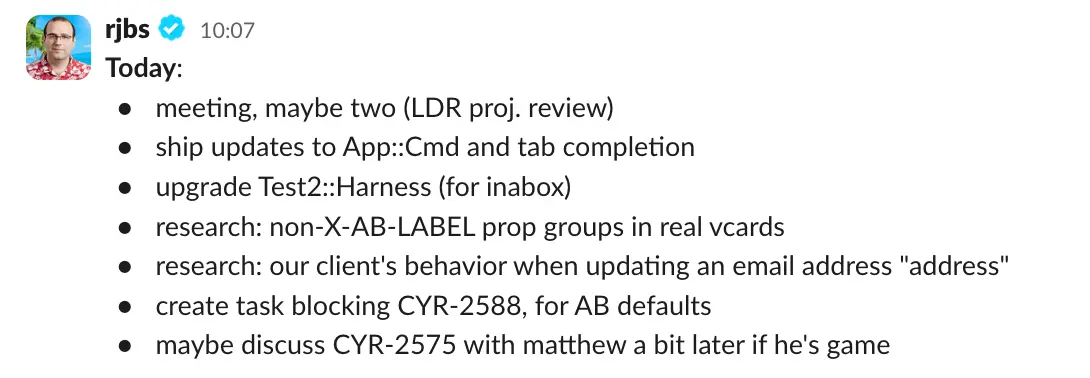
A problem here is that now I have two to-do lists. One is a real todo list that I can tick “done” on, and the other is a post in Slack that I want to refer back to, from time to time, to see whether I’m keeping up with what I said I’d do. GTD rightfully tells us that “more todo lists is worse than fewer todo list”, generally, and I wanted fewer. But I didn’t want to make Linear tasks every day for things like “drink water”. And putting my scrum in Notion would be tedious. And CalDAV with VTODO has its own problems.
What I wanted was a single todo list that would be easy to use, visually simple enough to just leave on my desktop for quick reference. I’d been thinking about such a program off and on (mostly off) for a year or so, and after some so-so but encourage experience having Claude produce SwiftUI applications for me, I thought I’d give this one a go.
The session took place over two days. After a brief false start using VTODO (well, Apple’s EventKit) as a backend, we pivoted to a custom data model and got something working. We iterated on that, adding features, fixing bugs, and tweaking the design for a good while. When I felt like it, I’d take a break to play Xbox or read a book. When I came back, Claude had not contexted switched. Meanwhile, I’d had time for that diffuse cognition mode to help me “think” about next steps.
The biggest shifts were about realizing that the data model was subtly wrong. This wouldn’t have been hard to fix by hand, but it would have been fiddly and boring. Instead, I said, ‘Here’s the new model, do it.” Claude asked some useful questions, then did it. Meanwhile, I read Wikipedia. (I also spent some time reading the Swift source code.)
As things stand now, the app seems very likely to be useful. There are a bunch of things I still want to add. Some of them, I have a good picture of how to get them. Others, I only know the general idea. In both cases, I feel confident that I can get closer to what I want without too much serious effort. Pruning development dead ends is cheap.
You can read the whole development transcript, but it’s long. Firefox says 400 pages. But it’s there in case you want to look.
Here’s the app, loaded with test data. (There’s a Perl program to spit out predictable test data which can be imported into the app for testing.)
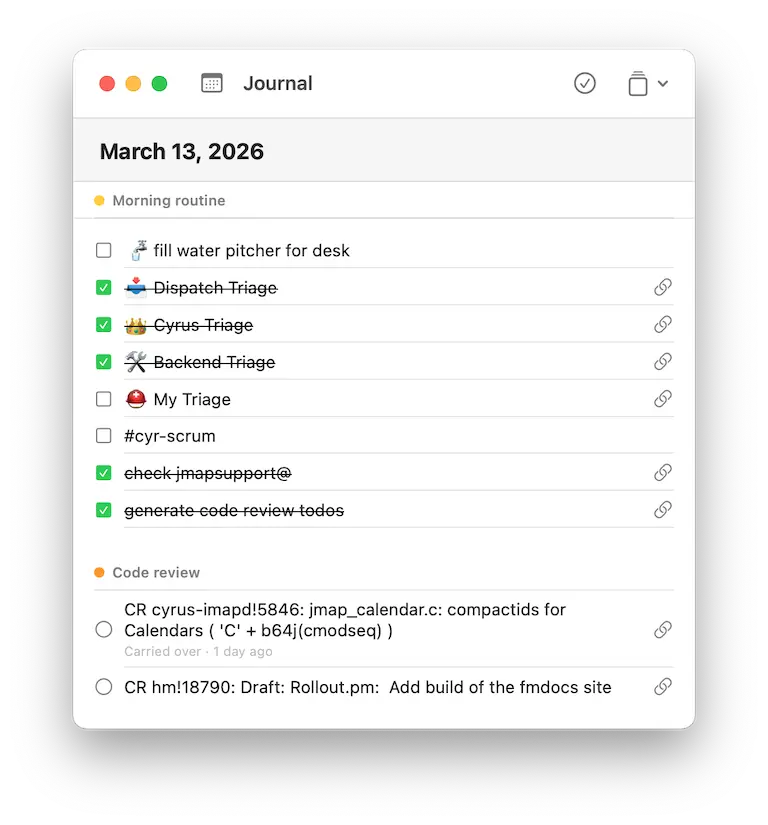
Here’s today’s page, and you can see what I’ve done and haven’t. At the bottom, if you squint, you might see that one of my code review tasks says “carried over - 1 day ago”, meaning that I first put it on my list yesterday, but still haven’t done it.
If we go back a while, we can see what a “finished” day looks like:
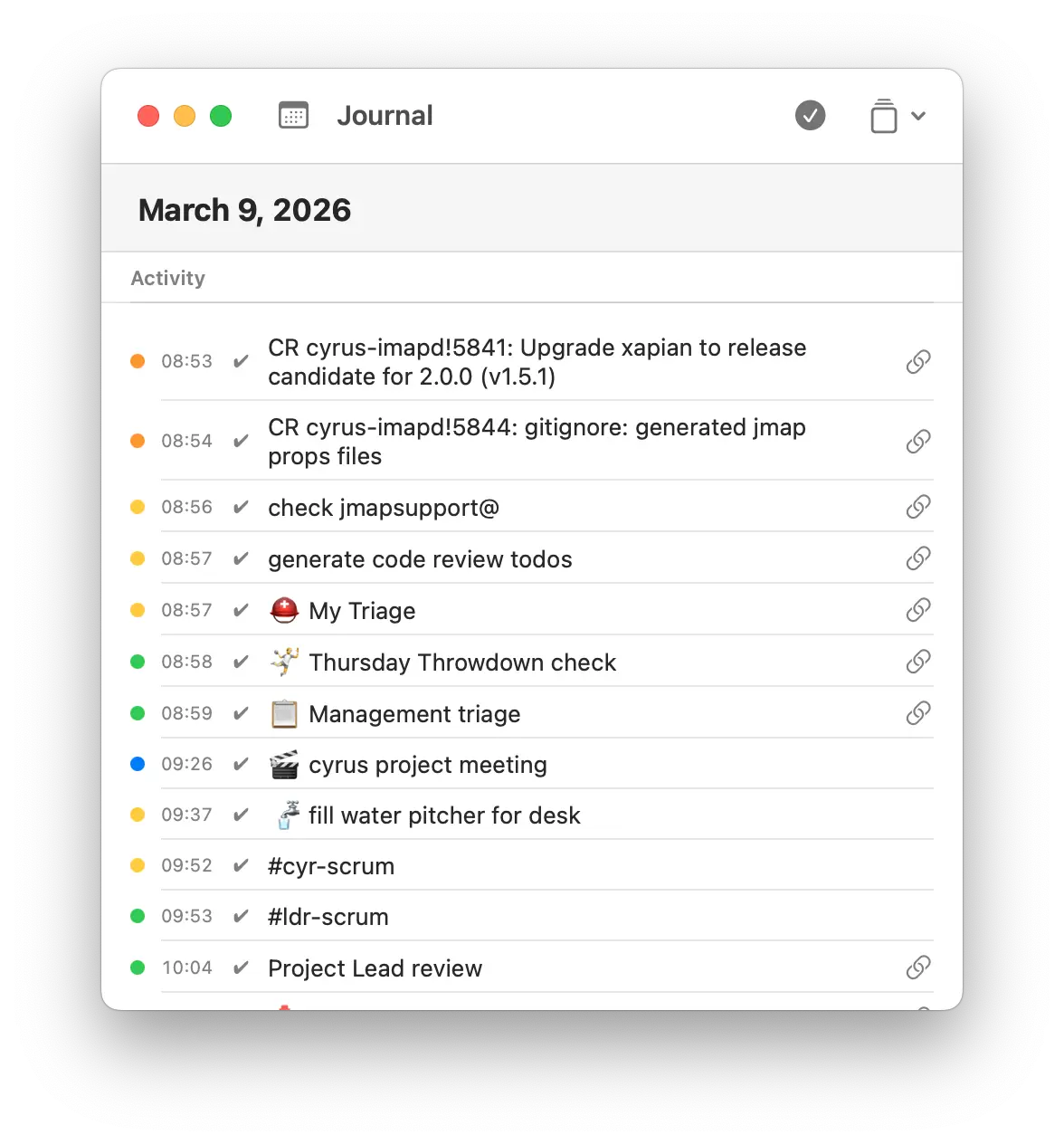
Now I can see all the things I did, when I marked them done, their category, and so on. I’m afraid I don’t have any days logged now that show some other things that could happen: things that didn’t get done would be shown in a “not done” section, showing that they were carried over and (maybe) done four days later. Some items could be shown as abandoned – I decided not to do them or carry them over. This is useful for those “fill the water” tasks. If I didn’t do that task on Monday, then when Tuesday starts, Monday’s todo is automatically abandoned. You can see the distinction in the previous screenshot: tasks that will carry over get round ticky bubbles, but tasks that will get auto-abandoned get square ticky boxes.
This is all pretty good, but wasn’t this supposed to help with Scrum? Well, it does! There’s a menu option to generate a “mrkdwn” (Slack’s bogus Markdown for chat) version of the day’s todo list into the macOS clipboard. Then I paste that into Slack. I can configure the report (or multiple versions of a report) so it doesn’t include personal items, for example. All of that: reporting, categories, and so on, are handled in the bundle manager.
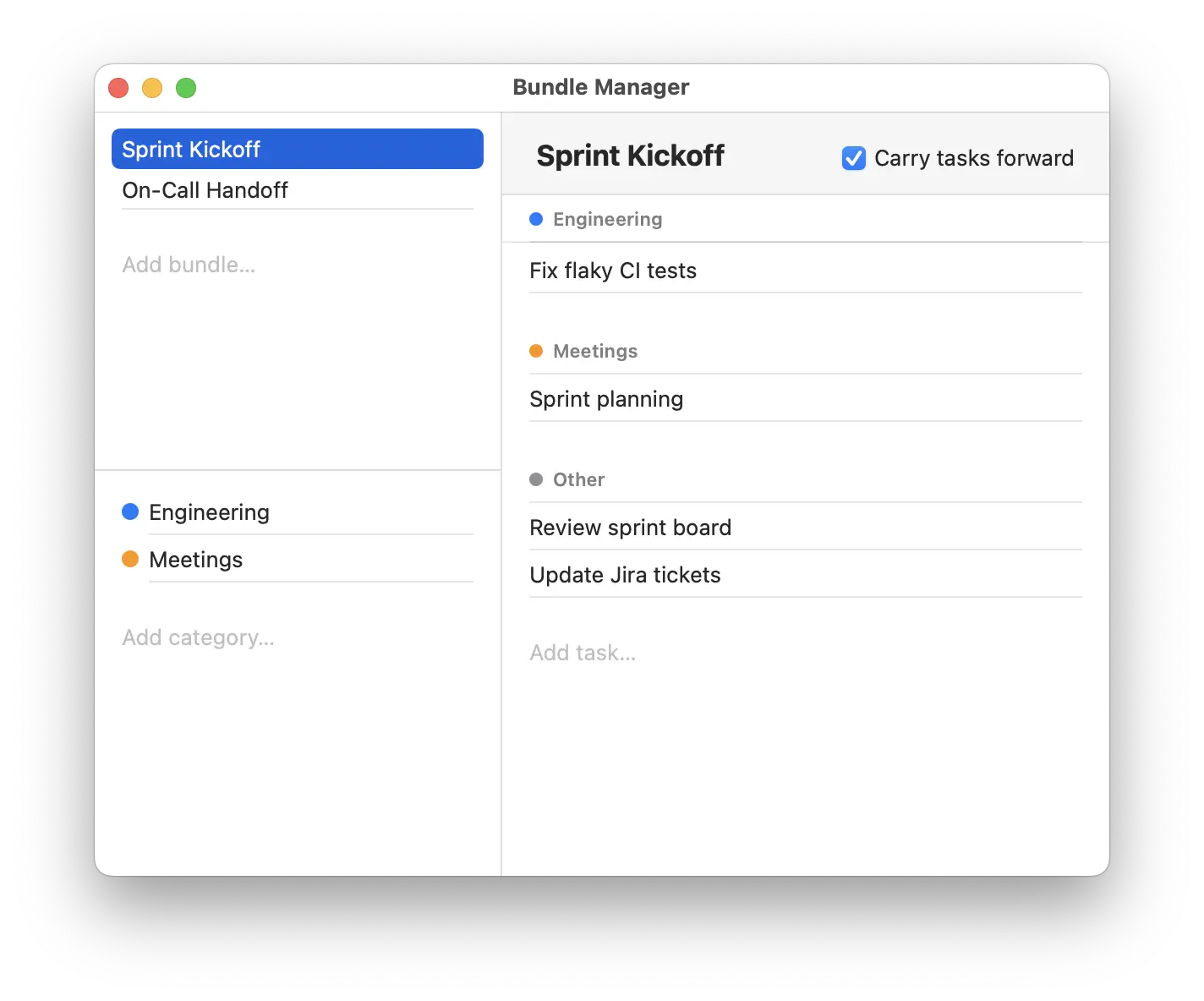
The bundle manager is named for “bundles”, which are groups of tasks that I can dump onto my list with two clicks. I have one for the start of a sprint, and I have another for standard work days. I imagine that I’ll have other bundles later for things like “prepare to travel” or “conference day”. But when I click “start a new day”, I get a blank page, and I know I better start with my daily bundle.
…and one of the items on my daily bundle is “make the code review tasks”.
It’s got a hyperlink (you may have noticed that todo items can have a little
link icon). The hyperlink is an iterm: URI that, when clicked, prompts me to
run a little Perl program. That program fetches all the GitLab and GitHub code
review requests waiting on me, turns it into JSON, and passes it to another
little program that turns them into todos in NerfJournal. So I click the link,
click “yes, run this program”, and then a bunch of specific-to-today tasks show
up. Then I mark the first task done. I am getting all my code review done
daily, just about. It’s a big process improvement.
wasn’t this post about Claude?
Well, sort of. I did all this with Claude. I described what I wanted, and I said I wanted it in SwiftUI, and Clade got to work building. I’d test, find bugs, realize that I had the wrong design, and iterate. I spent a big hunk of two days on this, and it has been a huge win. I could’ve built this on my own, for sure, but it would’ve taken weeks, at least, including “learn SwiftUI from scratch”. Possible, of course, but a much larger investment on a tool that, in the end, I might not have liked!
Is the code bad? I’m not sure. I don’t think so, but I’m not a Swift expert yet. But also: it only runs on my machine. I can see everything it does, and I can see it’s safe. I do not plan to sell it, support it, or run my business on it. Effectively, I summoned into existence a specialized tool that helps me do the job at which I am an expert, saving my expert time for expert problems. I think I will end up doing a lot of this. And hopefully I’ll pick up some new skills, as I go, from paying close attention to the new code I’m reading.